

Video review tools compared: which platform fits your workflow?
If you produce videos regularly, sooner or later you need a video review tool: a platform where clients watch cuts, comment right on the frame and approve versions. Classic email threads and password-protected zips are no longer fit for feedback loops – too slow, too error-prone, too scattered.
The market has grown crowded, and the right choice depends heavily on budget, team size and workflow: freelancers often do fine with lean tools, while agencies and larger productions need structured approval processes. This comparison sorts the most relevant platforms – from simple review tools to professional pipelines.
What matters in a video review tool
Before comparing prices, look at the five criteria where these tools genuinely differ:
- Frame-accurate comments. Feedback has to stick to the exact frame, not a rounded minute – otherwise the hunt starts all over again.
- Versioning. Comments belong to the cut they were made on. Version 2 starts clean, old feedback stays documented.
- No client login. Every forced registration costs feedback willingness. A link that opens in the browser is enough.
- Editing integrations. If you work in Premiere Pro or DaVinci Resolve, you want comments in your timeline instead of copying them out of emails.
- Storage and pricing structure. Video files are big – with some providers, storage quickly becomes the most expensive line item.
Looking for a Frame.io alternative? Start with the reason
Most people comparing video review tools are not starting from zero — they are already on Frame.io and wondering whether something else fits better. It helps to be precise about why, because the three common reasons lead to three different answers.
"The per-seat cost adds up." This is the most frequent complaint from solo creators and small studios. Frame.io is priced per user, so a two-person team plus a freelance editor gets expensive quickly — on top of Creative Cloud, cloud storage and everything else. If this is your reason, look at tools where reviewers are free and pricing is per workspace rather than per seat: Wipster, Krock.io, or Exportlab.
"I only need review occasionally." If video is a side dish next to photography, a dedicated review subscription is hard to justify. Vimeo Review costs nothing extra if you already host there, and Dropbox Replay covers the basics inside a Dropbox plan you may already pay for.
"I need more than review." Frame.io is a review tool, deliberately. It does not deliver photo galleries, hold contracts or give clients a permanent place to find their projects. If you are stitching Frame.io together with a gallery tool and a file transfer service, the honest fix is not a different review tool but a platform that covers the whole handover.
One thing Frame.io genuinely does better than most: deep Adobe integration and a mature interface built for large productions. If you sit inside an Adobe-centric agency pipeline with heavy version traffic, switching away is often a downgrade. The alternatives below make sense for a different shape of business, not as a blanket replacement.
Tools for freelancers and small teams
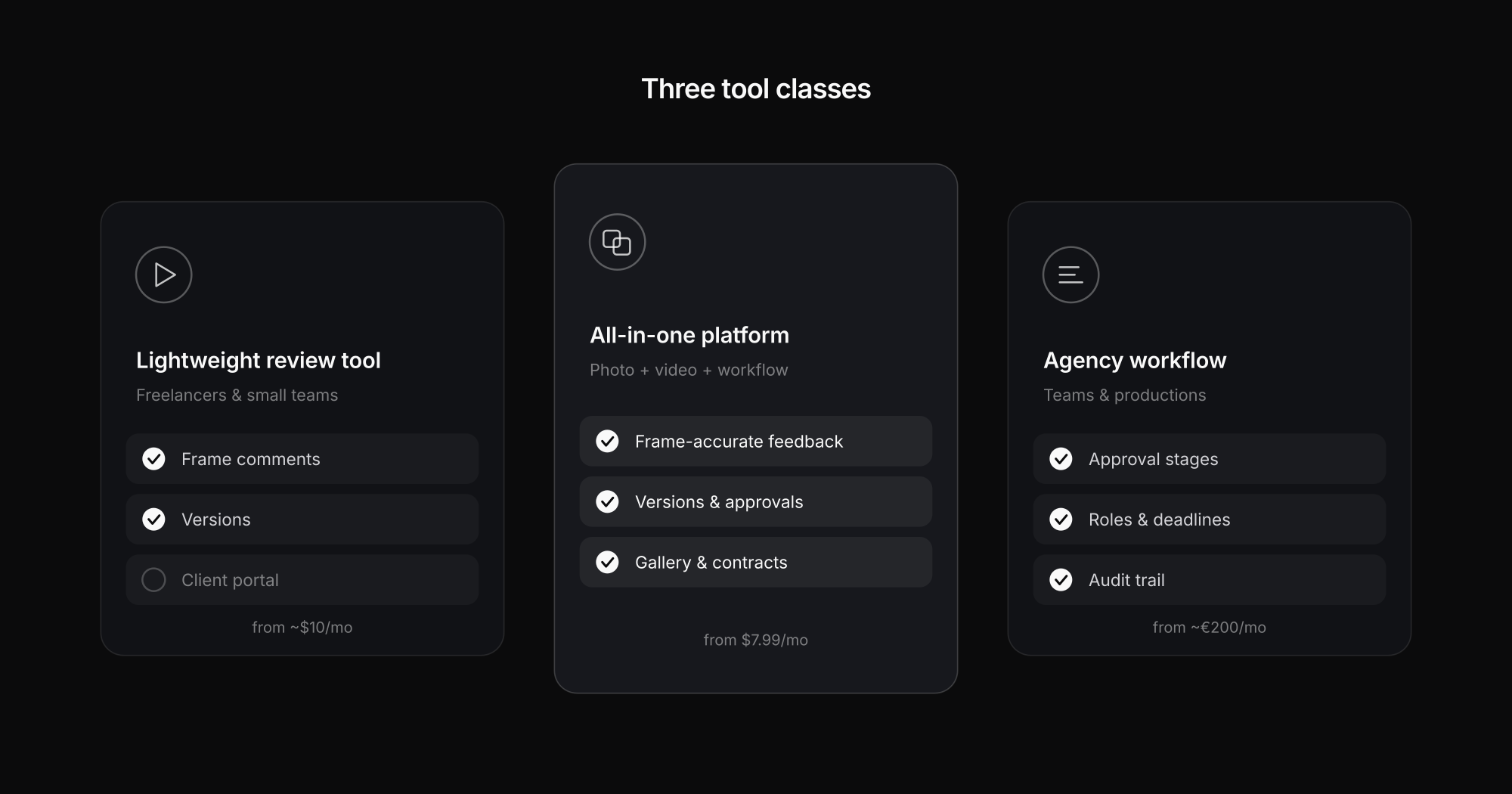
Wipster is a popular entry-level tool: a deliberately simple interface with frame-accurate comments, versioning and unlimited reviewers. The Light plan starts around $10/month with 50 GB of storage; reviewers are always free. A panel for Premiere Pro and Final Cut brings comments straight into the edit. Wipster shows its limits when scaling – storage gets tight with many projects, and the feature set stays intentionally narrow.
Exportlab takes a different route: it is an all-in-one platform for photo and video professionals where frame-accurate video feedback is one building block among many – alongside galleries, a client portal, contracts and tasks. Entry starts at our lowest paid tier with video review included. Comments sit on the exact frame and are tied to a specific version; integrations exist for Premiere Pro and DaVinci Resolve. It gets especially interesting if you deliver photos as well as video and don't want to maintain two separate tools.
Vimeo Review is the obvious choice if you already host on Vimeo: the review feature is included at no extra cost. Clients get a password-protected link with timecoded comments, versions can be swapped under the same URL, and Premiere users can sync feedback. If you already live in the Vimeo ecosystem, review software effectively comes free.
Krock.io is a younger tool that resembles Frame.io in many respects: frame-accurate feedback, storyboard features, unlimited reviewers – even the free base plan includes two users. From about $10 per user/month you get 4K playback and unlimited projects. A fresh alternative especially for animation and motion design work.
Platforms for agencies and larger productions
Frame.io is considered the industry standard, especially in Adobe-centric workflows: timecoded comments appear right in the Premiere timeline, and versioning and interface are highly polished. The flip side is comparatively expensive storage – large agencies pay noticeably more per terabyte than elsewhere – and a volume of notifications some teams find excessive.
Filestage focuses on structured approval workflows: you define stages like "creative → lead → client" and assign reviewer roles. Videos, images and PDFs can all be annotated, and decisions are logged. That makes Filestage strong for agencies with formal sign-off processes – but it takes onboarding time and starts at roughly €200/month.
ReviewStudio goes one step further toward project control: on-frame markups, private and public comment threads, a presentation mode for live reviews – and feedback can be turned into tasks with deadlines and reminders. Ideal when every approval step must be documented; the scope is reflected in the price accordingly.
Special cases: live review, gallery tools and tight budgets
Real-time collaboration is its own tool class: Evercast streams the edit live in up to 4K with very low latency – client and editor see exactly the same picture, can draw and talk, the way large productions run their post-production. cineSync plays back high-resolution material in sync and ships color tools, which made it a fixture in VFX studios. Both are on the expensive side and usually oversized for solo videographers.
Picflow comes from the opposite direction: originally a client gallery for photographers, it also supports video proofing with comments, color labels and approval status up to 4K/HDR. And Dropbox Replay is the pragmatic minimal option for anyone already on Dropbox – comments and approval links without a dedicated tool, but without workflow depth either.
All tools at a glance
| Platform | Budget | Team size | Focus |
|---|---|---|---|
| Wipster | Low (from ~$10) | Freelancer/small | Simple review, unlimited reviewers, Premiere/FCP panel |
| Exportlab | Low (see pricing) | Freelancer/team | All-in-one photo + video: frame feedback, versions, client portal |
| Vimeo Review | Low (included) | Any | Review built into Vimeo hosting, timecoded comments |
| Krock.io | Low–mid ($0–10) | Small/team | Frame feedback, storyboards, 4K playback |
| Frame.io | High ($15–25) | Mid/large | Industry standard, deep Adobe integration |
| Filestage | Mid–high (from ~€200) | Team/agency | Approval stages, roles, audit trail |
| ReviewStudio | Mid–high | Team/agency | Review + tasks, deadlines, presentation mode |
| Evercast | High | Large/studio | Live streaming review in 4K, minimal latency |
| cineSync | High (from ~$19) | Large/studio | Synchronized remote review with color tools |
| Dropbox Replay | Low | Any | Basic review inside the Dropbox ecosystem |
Which video review tool fits whom?
The comparison boils down to a few clear rules of thumb:
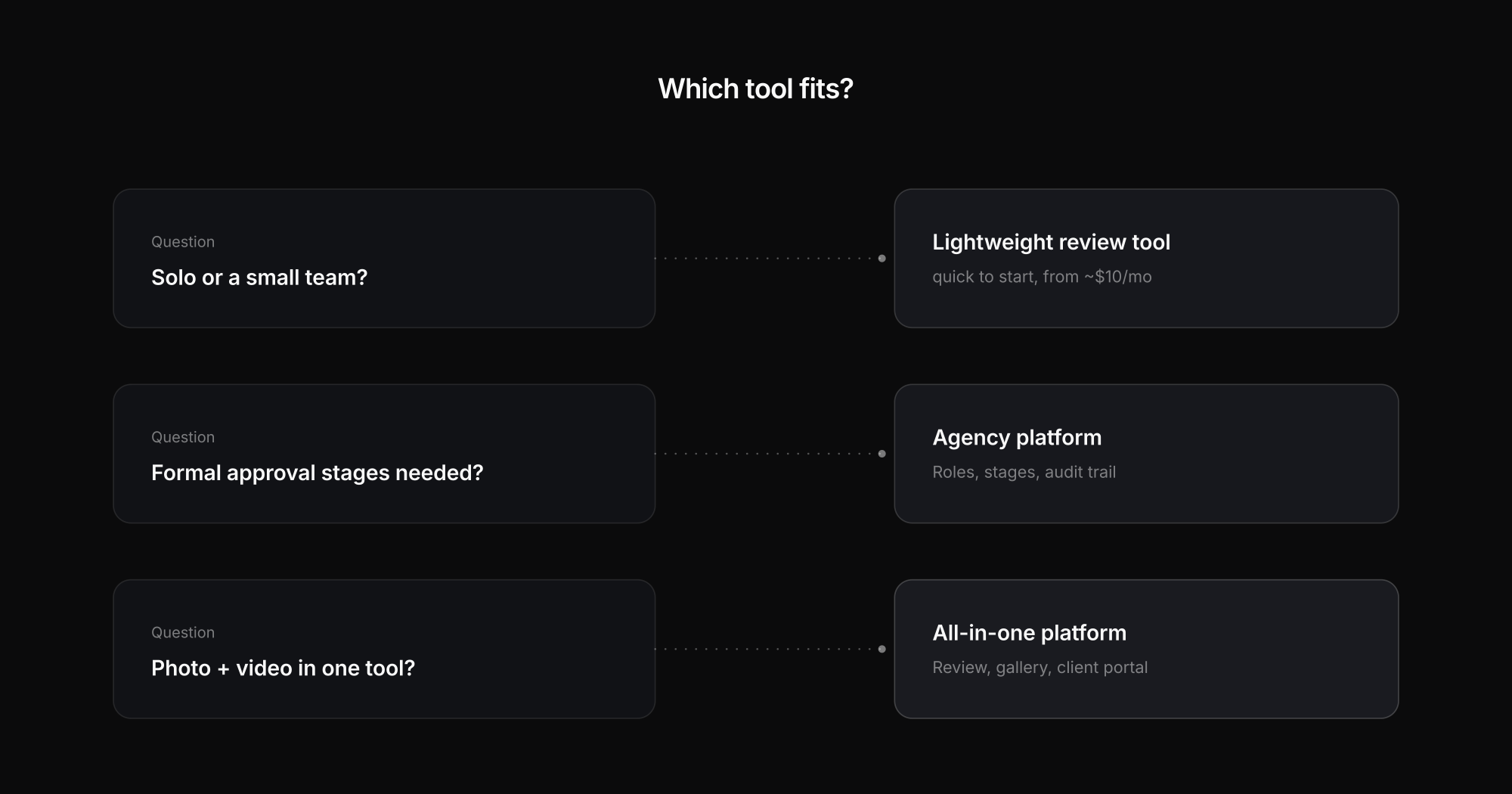
- Already hosting on Vimeo? Use the built-in Vimeo Review – zero extra cost, zero migration.
- Adobe-centric agency with budget? Frame.io is the standard; pick Filestage or ReviewStudio if formal approval stages matter more than edit integration.
- Solo or small team? Wipster and Krock are cheap and quick to start with.
- Photo and video from one hand? Then Exportlab is worth a look: review, galleries, client delivery and contracts in one tool instead of four subscriptions – the complete workflow for videographers.
- Live sessions with a director's-room feel? Evercast or cineSync, if budget and project size justify it.
FAQ: video review tools
What is a video review tool?
A platform where clients and team watch cuts in the browser and comment directly on the video – frame-accurately instead of "at minute 2:15". Comments, versions and approvals stay in one place instead of scattered across email threads.
How much does a video review tool cost?
The range goes from free (Vimeo Review with existing hosting, Krock's base plan) through $8–15/month for freelancer tools up to several hundred euros per month for agency platforms like Filestage. What matters is often less the plan price than the storage cost for large video files.
Are there free video review tools?
Yes – Vimeo Review is included in Vimeo hosting, Krock.io has a free plan with two users, and Dropbox Replay covers basic feedback inside a Dropbox subscription. For regular client work, free plans quickly hit storage and feature limits though.
Which review tool integrates with Premiere Pro or DaVinci Resolve?
Frame.io and Wipster offer Premiere panels; Exportlab has integrations for Premiere Pro and DaVinci Resolve – exports land directly in review and comments show up in your editing software. If you live in the timeline, weight this criterion heavily.
Do my clients need an account?
With most tools in this comparison, no: the client gets a link and comments in the browser. That is exactly what to look for – any forced login noticeably lowers feedback willingness.
What is the best Frame.io alternative?
It depends on why you are leaving. For per-seat costs, pick a tool with free reviewers and workspace pricing — Wipster, Krock.io or Exportlab. For occasional review, Vimeo Review or Dropbox Replay cost nothing extra if you already pay for the host. For structured agency approvals, Filestage or ReviewStudio. And if you deliver photos alongside video, a review-only tool is the wrong category — you want a platform that covers delivery too.
Is there a free Frame.io alternative?
Partly. Krock.io has a free plan for two users, Vimeo Review is included in Vimeo hosting, and Dropbox Replay comes with a Dropbox subscription. All of them hit storage or feature limits fast once you run regular client projects — video files are simply large. Free plans work well for evaluating, rarely for production.
Why do photographers and videographers leave Frame.io?
The reasons that come up most often are per-user pricing that grows with the team, storage limits on lower tiers, and the fact that Frame.io only covers review — photo delivery, contracts and client access still need other tools. For Adobe-centric agencies with heavy version traffic, none of that outweighs the integration depth, which is why Frame.io remains the standard there.
Conclusion
There is no single best video review tool – there is the right one for your workflow. Team size, budget and the question "just review, or the whole client process?" decide: solo editors ride cheaply with Wipster, Krock or Vimeo Review, agencies run structured with Frame.io or Filestage. And if you deliver both photos and videos as a videographer or hybrid studio, Exportlab gives you review, gallery and client portal in one platform – instead of spreading feedback, delivery and contracts across three tools.