

Shot List: What Goes in Each Column, and Why the Order Matters
A shot list is the document that decides whether the edit has what it needs. Not the schedule, which says when you shoot — the shot list says *what*, in enough detail that the footage answers the question when you sit down to cut.
Most shot lists are a column of descriptions. That works until the shoot runs late and someone has to decide what to drop, or until the edit reveals that the one cutaway everybody assumed existed was never on the list. This article covers the columns that earn their place, how the list connects to the schedule, and where lists fall apart in practice.
The columns that earn their place
A shot list has one job: make every shot unambiguous and rankable. Anything that does not serve that is decoration.
| Column | What it holds | Why it matters |
|---|---|---|
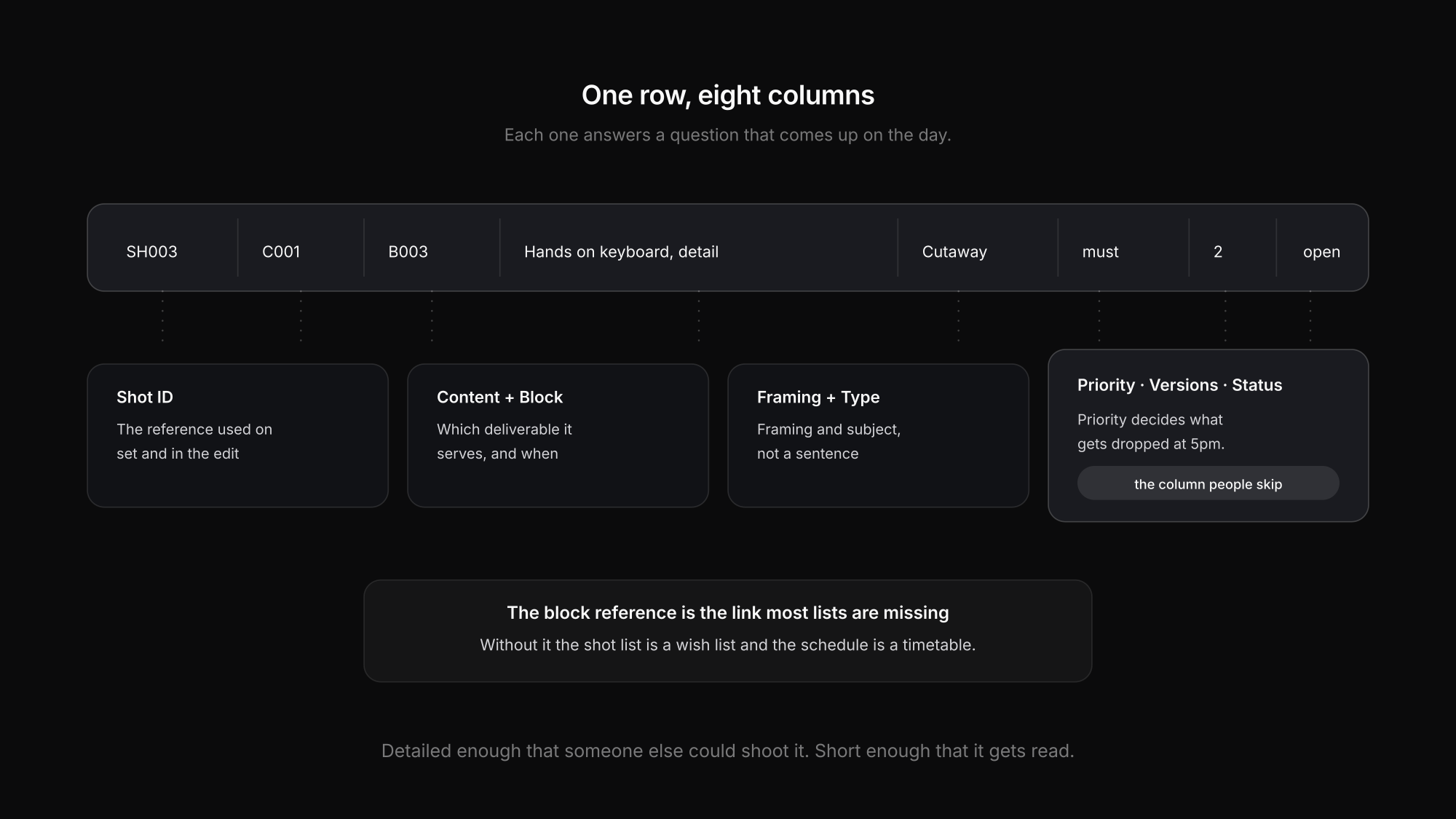
| Shot ID | SH001, SH002… | The reference everyone uses on set and in the edit |
| Content reference | which deliverable this shot serves | Without it, nobody can tell which shots are still missing for a given video |
| Block reference | which shooting block it happens in | Connects the list to the schedule — the single most useful link |
| Shot / subject | "Medium close, interview, CEO" | Framing plus subject, not a sentence |
| Type | interview, B-roll, detail, drone, cutaway | Lets you group shots that share a setup |
| Priority | must-have / should-have / nice-to-have | The column that decides what gets cut when time runs out |
| Versions | how many takes or variants are wanted | "Two versions" prevents a reshoot you did not budget for |
| Status | open / done / dropped | On a multi-day shoot, the only way to know where you stand |
Optional but often worth it: a reference image, the lens or framing note, and audio requirements where they differ from the default.
Priority is the column people skip
Almost every shoot runs behind at some point. What happens then is the real test of the list.
Without a priority column, the decision about what to drop gets made at 5pm by whoever is most tired, based on what they remember. With one, it is already made: nice-to-haves go first, should-haves next, must-haves never.
Three levels is enough. More granularity than that is a discussion, not a plan.
How the shot list connects to the schedule
This is the link that turns two documents into one working system, and it is usually missing.
A shot list on its own answers "what do we need". A shooting schedule answers "when do we shoot". Neither answers the question that actually comes up at 10:15am: *what are we shooting right now, and what still has to happen in this setup before we move?*
The fix is a block reference on every shot. Once each shot names the block it belongs to, three things become possible:
- The person running the day can see at a glance whether a block's shots are all done before the crew moves on
- A delay makes the consequence visible — you know which shots were in the block you just lost
- The edit can trace any missing shot back to the day and block it was meant to happen in
Without that link, the shot list is a wish list and the schedule is a timetable, and nobody notices the gap until the cut.
Shot list mistakes that cost you in the edit
No priority column
When the day runs late, the decision about what to drop gets made by whoever is most tired.
Descriptions instead of framing
"Nice shot of the building" is not a shot. Framing plus subject is: "wide, exterior, from the north entrance".
No cutaways listed
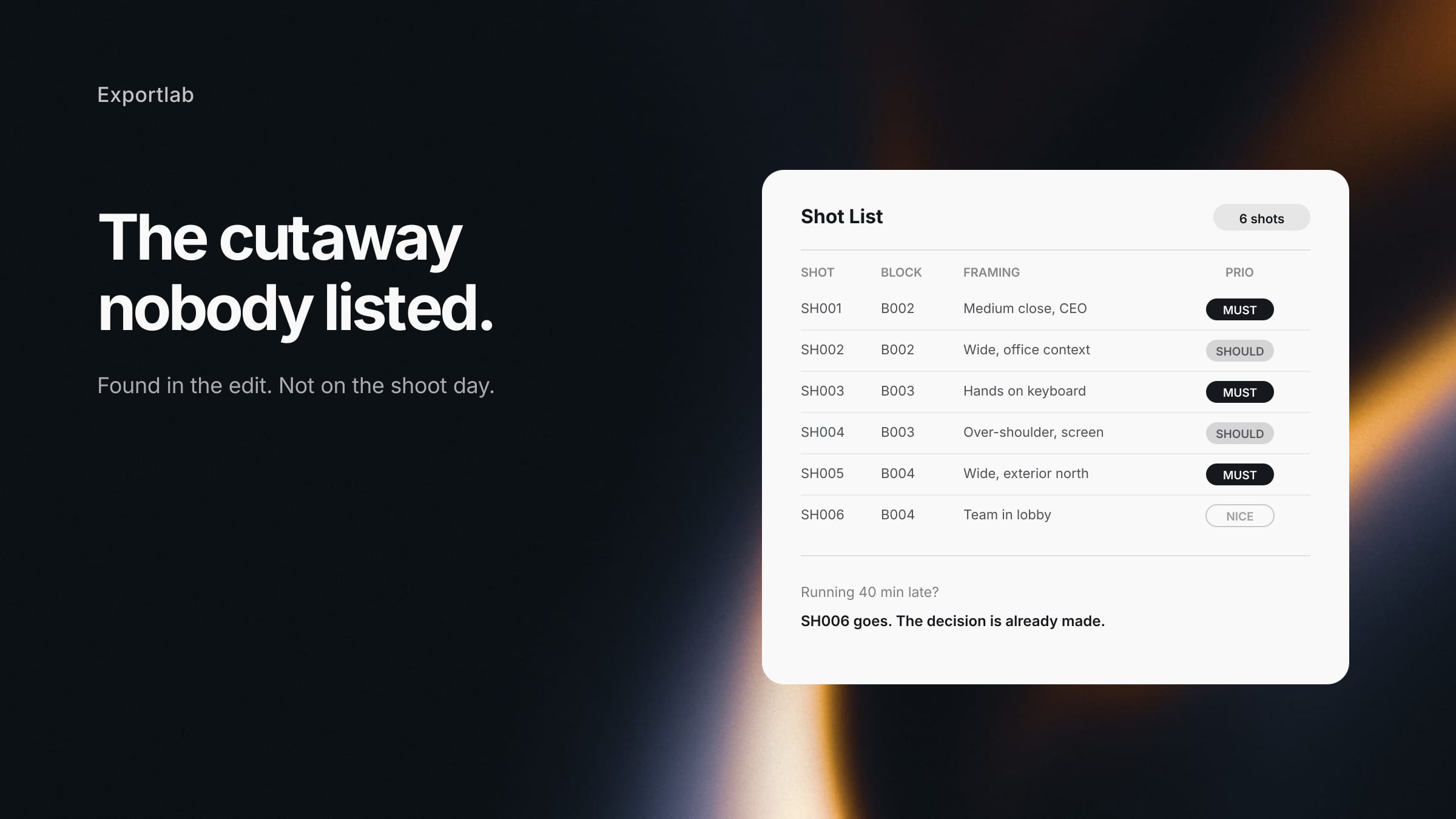
Cutaways are what save an interview edit. They never make the list because nobody thinks of them as shots.
One list for every deliverable
If three videos come out of one shoot, each needs its own content reference — otherwise you cannot tell what is missing for which.
No version count
"We got it" means one take. The edit wants a safety and often a second framing.
Status never updated
On a multi-day shoot, an un-updated list is worse than none, because it looks authoritative and is wrong.
A worked example
For a corporate shoot with one interview and supporting footage, the list stays short and still covers the edit:
| Shot | Content | Block | Framing | Type | Prio | Versions |
|---|---|---|---|---|---|---|
| SH001 | C001 | B002 | Medium close, CEO, eyeline left | Interview | must | 2 |
| SH002 | C001 | B002 | Wide, CEO in office context | Interview | should | 1 |
| SH003 | C001 | B003 | Hands on keyboard, detail | Cutaway | must | 2 |
| SH004 | C001 | B003 | Over-shoulder, screen visible | Cutaway | should | 1 |
| SH005 | C002 | B004 | Wide, exterior, north entrance | B-roll | must | 1 |
| SH006 | C002 | B004 | Team walking through lobby | B-roll | nice | 2 |
Two things to notice. The cutaways in B003 are marked must-have — because an interview edit without them forces you to hold on a talking head for ninety seconds. And SH006 is the only nice-to-have, which means it is also the only thing that disappears when the day runs 40 minutes late.
Where the shot list lives
The list is only useful if the person holding the camera can see it. Which is a distribution problem, not a documenting problem.
A spreadsheet works for one shoot day. From two parallel units upwards it breaks the same way every schedule breaks: competing versions, unreadable on a phone, and each person wading through shots that belong to another unit.
In Exportlab, the shot list sits inside the production plan rather than beside it — attached to the content item and to the block where it is shot. On the day, the app shows the current block with its shots for the person looking at it, so checking off a shot and knowing what is left happens in the same place. Production planning is currently in beta and enabled per workspace.
If you want the structure without the software first, build the list as its own sheet in whatever spreadsheet you already use for the schedule, and give every shot the block ID it belongs to. That one column is what makes the two documents work together.
FAQ: Shot lists
What is a shot list?
A list of every shot a production needs, with enough detail that each one is unambiguous: framing and subject, which deliverable it serves, which block it is shot in, how important it is, and how many versions are wanted.
What is the difference between a shot list and a storyboard?
A shot list is text and covers every shot. A storyboard draws selected shots to communicate framing and staging visually. They complement each other; the list is the complete record, the board explains the intent for the shots that need it.
How detailed should a shot list be?
Detailed enough that someone else could shoot it, and short enough that it gets read. Framing plus subject in one line beats a paragraph. Reference images do more than long descriptions where framing is critical.
Who writes the shot list?
On a small shoot, whoever is directing — often the same person operating the camera. On larger productions the director and DP together, with the 1st AD mapping shots onto the schedule blocks.
Should the shot list include audio?
Note it where it differs from the default. If every interview uses the same lavalier setup, that belongs in the equipment list, not repeated on every row. A shot needing a boom or wild sound is worth flagging.
Conclusion
A useful shot list is not the most detailed one. It is the one where every row names framing and subject, points at the deliverable it serves and the block it happens in, and carries a priority that makes the 5pm decision for you.
The link to the schedule is what most lists are missing, and it is the cheapest thing to add: one block reference per shot. After that, the remaining problem is distribution — getting the right shots in front of the right person on the day. For the schedule side of that, start with the shooting schedule; for the day itself, the call sheet.